
Delta Key: How to Get and Use the Delta Executor Key
Delta Key Guide, Verification & Activation
Learn how to get and use the Delta Executor Key on Android, iOS, and PC with simple steps and troubleshooting tips.
Many Delta Executor users face difficulties when trying to obtain and use a Delta Key. The process can be confusing for beginners due to verification steps, advertisements, website redirects, expired keys, and other technical issues. Users may also struggle to enter the key correctly or identify trustworthy sources, making it difficult to proceed.
What Is a Delta Key?
A Delta Key is an access code required by certain versions of Delta Executor to complete the verification process before use. Depending on the device and version, users may need to complete specific steps to obtain the key. Unlike a Roblox password or game pass, the Delta Executor Key serves as an access requirement for the executor itself. Some versions use time-limited keys that may expire after approximately 24 hours, requiring users to obtain a new one.
How Does the Delta Key System Work?
The Delta Key system starts when users open Delta Executor and see a screen requesting an access code. If they do not have a valid key, they can select the Get Key or Receive Key option to begin the process. This option may open a browser page where users must complete the required verification steps before receiving their Delta Executor Key. Since the process can vary by device and version, always follow the latest on-screen instructions rather than outdated guides.
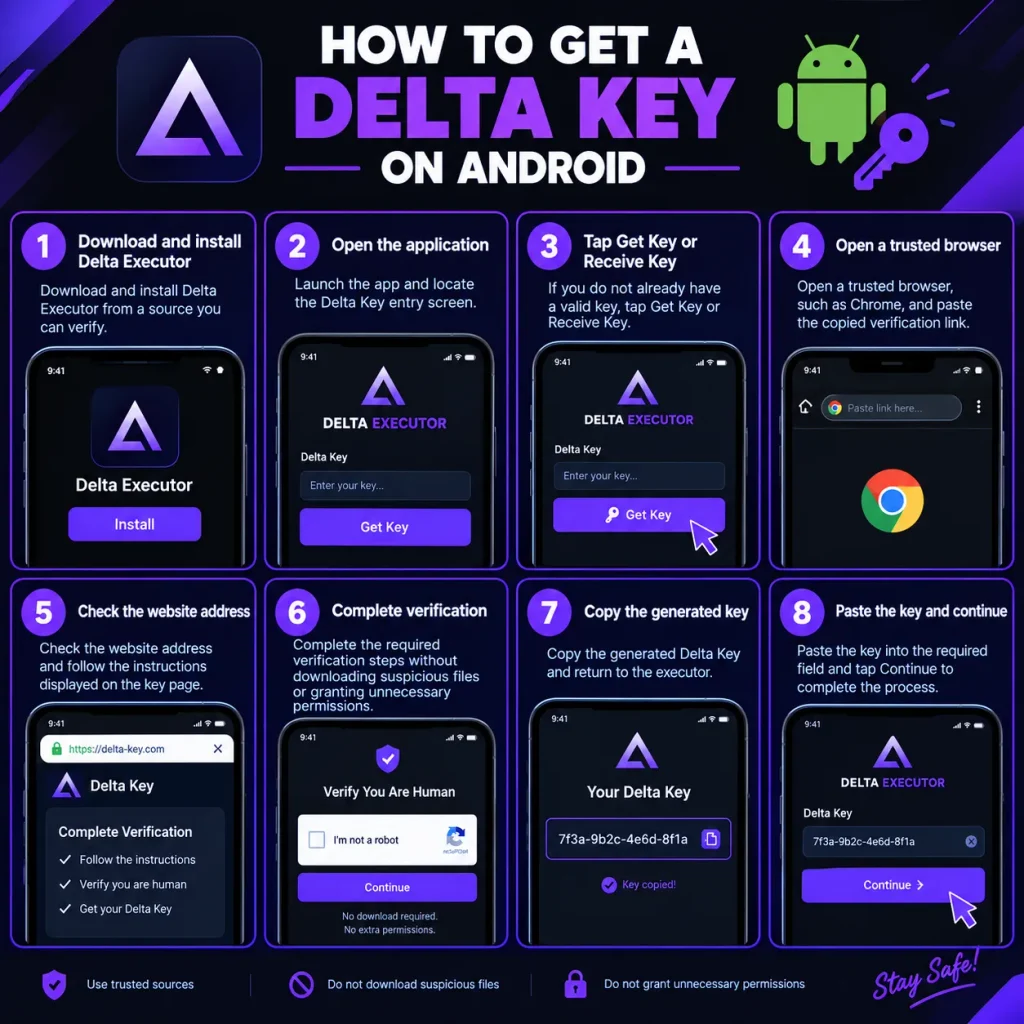
How to Get a Delta Key on Android
- Download and install Delta Executor from a source you can verify.
- Open the application and locate the Delta Key entry screen.
- Tap Get Key or Receive Key if you do not already have a valid key.
- Open a trusted browser, such as Chrome, and paste the copied verification link.
- Check the website address and follow the instructions displayed on the key page.
- Complete the required verification steps without downloading suspicious files or granting unnecessary permissions.
- Copy the generated Delta Key and return to the executor.
- Paste the key into the required field and tap Continue to complete the process.
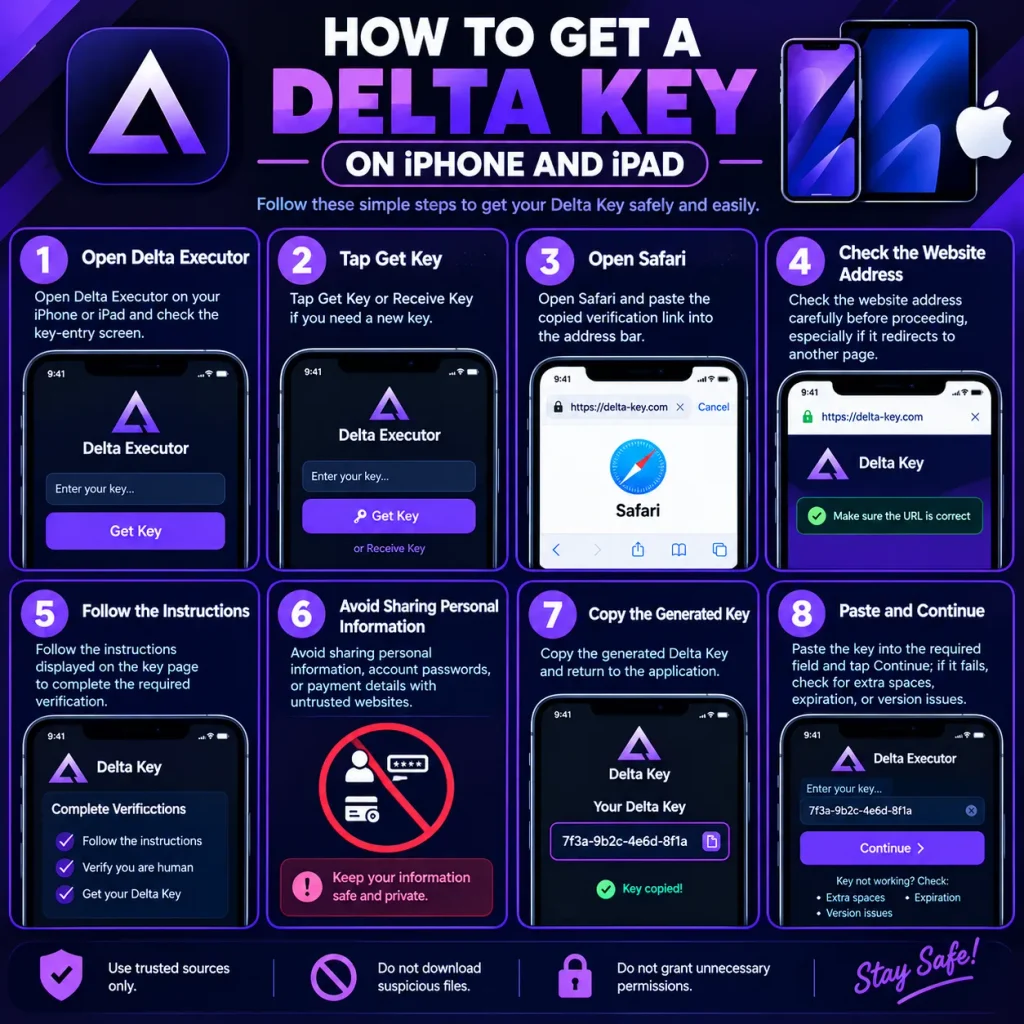
How to Get a Delta Key on iPhone and iPad
- Open Delta Executor on your iPhone or iPad and check the key-entry screen.
- Tap Get Key or Receive Key if you need a new key.
- Open Safari and paste the copied verification link into the address bar.
- Check the website address carefully before proceeding, especially if it redirects to another page.
- Follow the instructions displayed on the key page to complete the required verification.
- Avoid sharing personal information, account passwords, or payment details with untrusted websites.
- Copy the generated Delta Key and return to the application.
- Paste the key into the required field and tap Continue; if it fails, check for extra spaces, expiration, or version issues.
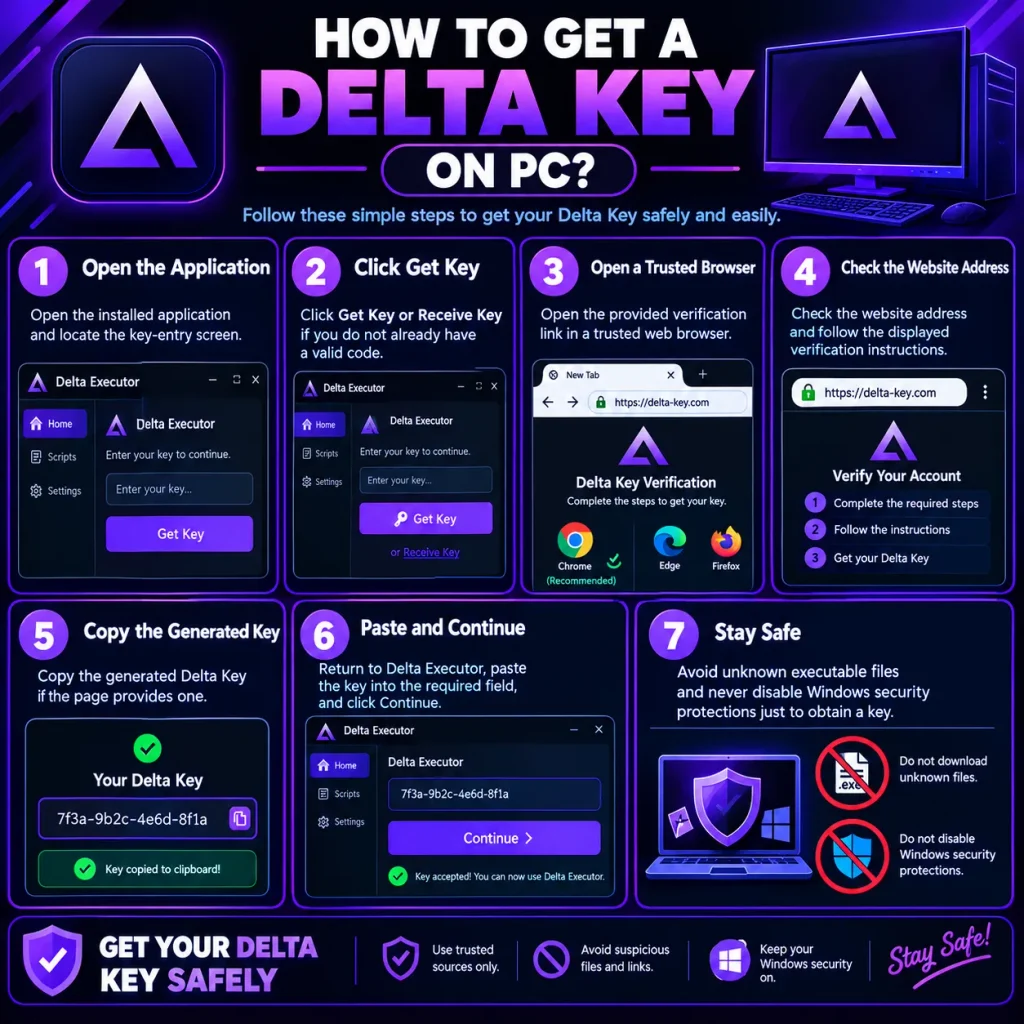
How to Get a Delta Key on PC?
- Open the installed application and locate the key-entry screen.
- Click Get Key or Receive Key if you do not already have a valid code.
- Open the provided verification link in a trusted web browser.
- Check the website address and follow the displayed verification instructions.
- Copy the generated Delta Key if the page provides one.
- Return to Delta Executor, paste the key into the required field, and click Continue.
- Avoid unknown executable files and never disable Windows security protections just to obtain a key.
How Long Does a Delta Key Last?
Some versions of the Delta Key system provide access for approximately 24 hours, after which users may need to generate a new key. However, the Delta Executor Key validity period can vary depending on the version, verification errors, server issues, or compatibility problems. To avoid interruptions, check the key system’s current validity instructions and request a replacement only when your key expires.
Delta Key Features
Access Verification
The key acts as an access code that the application checks before allowing the user to proceed. This helps enforce the application’s access requirements.
Time-Limited Access
Some implementations use keys that expire after a set period. Expiration requires users to obtain another code if they want to continue using that version.
Simple Code Entry
The process generally involves copying a code from a supported key page and pasting it into the application’s key field where input option is.
Version-Dependent Requirements
The key requirements, verification pages, and available options may differ between releases and devices.
Common Delta Key Problems and Solutions
| Problem | What to Check |
| Invalid Key | Check for extra spaces, typing errors, or an expired code. |
| Expired Key | Review the displayed validity period and obtain a replacement through the supported process if needed. |
| Key Page Not Loading | Check your internet connection and try reopening the page in an updated browser. |
| Verification Not Completing | Review the page instructions and avoid suspicious redirects or forced downloads. |
| Key Button Not Working | Restart the application and check whether the current version has a known issue. |
| Key Rejected After Copying | Confirm that you copied the complete code and that it belongs to the correct application version. |
| Repeated Redirects | Close suspicious tabs and verify the destination website before continuing. |
| Application Still Requests a Key | Check whether the code expired or whether the installed version requires a different verification process. |
Frequently Asked Questions
Is the Delta Key free?
Some Delta Key systems provide access codes without a direct fee. However, requirements can vary by version, and users should be cautious of websites that request payment or sensitive information.
How long is a Delta Key valid?
Some versions use a validity period of approximately 24 hours. Check the current application’s instructions because the duration may vary.
Why does my Delta Key say invalid?
Possible causes include extra spaces, an expired code, a server problem, or a key that does not match your application version. Check these issues before trying again.
Can I use the same key on Android and iOS?
Not necessarily. Key requirements may vary between platforms and application versions. Follow the instructions provided for your particular installation.
Do I need a key every time I open Delta Executor?
That depends on the version’s verification system. Some versions accept a valid key until it expires, while others may request verification again.
Can I get a Delta Key without completing verification tasks?
This depends on the current system. Avoid unofficial bypass pages that promise instant access but require unknown downloads, credentials, or security changes.
Conclusion
The Delta Key is an access code required by certain versions of Delta Executor to complete the verification process. Understanding how to obtain a key, enter it correctly, and fix common errors can help beginners navigate the process more easily. Whether you use Android, iOS, or a supported PC version, always follow the latest instructions for your device. To stay safer, verify websites, avoid suspicious downloads, and never share your Roblox login details with untrusted services.